

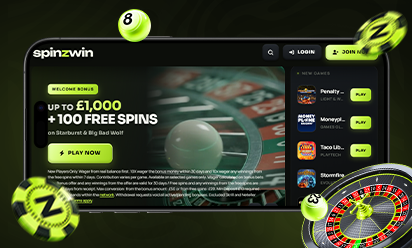
+ 100 FREE SPINSon Starburst & Big Bad Wolf
New Players Only. Wager from real balance first. 10X wager the bonus money within 30 days and 10x wager any winnings from the free spins within 7 days. Contribution varies per game. Available on selected games only. Wager calculated on bonus bets only. Bonus offer and any winnings from the offer are valid for 30 days / Free spins and any winnings from the free spins are valid for 7 days from receipt. Max conversion: from the bonus amount: £50 or from free spins: £20. Min Deposit £10 required. Limited to 5 brands within the network. Withdrawal requests void all active/pending bonuses. Excluded Skrill and Neteller deposits. Full Terms apply.
Pay by Phone Casino UK at Spinzwin

A pay by phone casino lets you put money into your casino account using your mobile phone, with the amount either added to your monthly phone bill or taken from your pay as you go credit. At Spinzwin, this method is called Pay via Phone, it is for UK players, it works for deposits only, and you don’t have to type in any card number at all.
Do you hate digging out your debit card every time you want to top up your balance? Have you ever been sitting on the bus with a game in mind and your wallet lying at home on the kitchen table? Well then, paying by phone may possibly be the method you have been looking for. All you need is your mobile number and the phone itself, becuase the security code comes to you by text message, and once you type it in, the money usually shows up in your Spinzwin balance within a few seconds.
It is not a perfect method though, and we would rather tell you that right at the start than have you find it out later on your bill. The deposits are small, there is a fee on each one, and you cannot take your winnings back out the same way. This page describes in detail how Pay via Phone works at Spinzwin, the steps to make a deposit, the costs and the limits, how withdrawals work, and how it compares with the other payment methods on our platform. Go through it to have a better understanding of the method before you use it:
What Is a Pay by Phone Casino?
If you don’t know what a pay by phone casino is, it is simply an online casino that accepts deposits through your mobile network instead of a bank card or an e-wallet. The proper name for it is carrier billing, or mobile billing, and you may also see it called pay by mobile, phone bill casino or pay via phone casino on different sites, but it is all the same idea. Different casino sites use different companies for it, you may have heard of Boku or Payforit for example, and here at Spinzwin the one doing the job for us is PayViaPhone.
Now where the money actually comes from, that depends on what sort of phone deal you have got. Put £20 in on a Saturday night while you are on a pay monthly contract, and that £20 just sits on your next phone bill with the calls and the data and everything else, getting paid whenever the bill gets paid. Pay as you go is a bit different, the £20 is taken off your top-up credit there and then, hence there has to be enough credit on the phone before you even start. Either way, we never see your bank details. All we see is that the payment has been approved through your phone number.
If someone had told you some years back that you would one day be putting a casino deposit on the same bill as your texts, you would probably have laughed at them. Well, here we are now. Today alot of players who mostly play on their phone use it, and mostly for the small top-ups, a tenner here, twenty quid there.
What You Need Before You Pay by Phone
Before you head over to the cashier, there are a few things that must be in place, otherwise the payment may simply not go through, and that is quite frustrating when you were all set to play.
The very first thing is your Spinzwin account, it has to be registered and fully verified, no shortcuts there, as every licensed casino in the UK has to check your age and identity before you are allowed to deposit or play anything. After that it is just a UK mobile number and the phone itself sitting in your hand (or at least on the table next to you), because the codes come to it by SMS while you are paying.
The number really should be in your own name as well. A work phone, or one that sits on your partner’s contract or your mum’s, please keep those out of your casino deposits. Apart from the fact that it may get blocked, it simply isn’t your money to spend. Pay as you go users need enough credit to cover the deposit, while contract users should check that their network allows these kind of charges in the first place. On some networks there is a spending cap you can put on the account, or a block on third-party charges, and if one of those happens to be switched on for you, the payment will most likely just bounce. That is not a fault on our side, mind you, a quick call to your network or a look in your network’s app will usually sort it out.
How To Deposit with Pay via Phone at Spinzwin
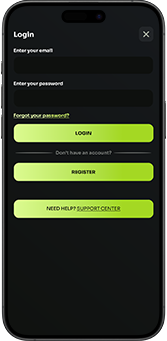
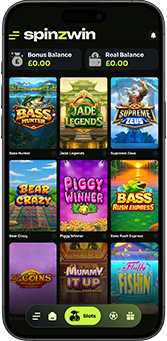
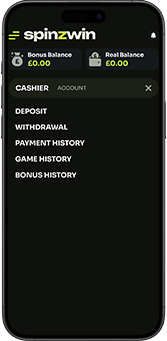
The deposit process is really simple, and once you have done it a single time, it won’t take you more than a minute or two after that. You log in first, with the email address and the password you signed up with. Up in the top left corner of the screen there is a ‘Menu’ button, give it a tap and the ‘Cashier’ option is right there in the list that opens. Click on it and then choose ‘Deposit’. Here you will get to see all the payment methods available to you, laid out as small tiles with thier logos on them, and Pay via Phone is one of them.
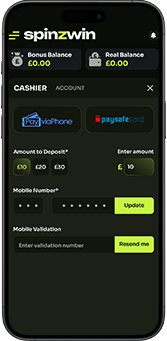
Once you select it, the deposit amounts show up as buttons, £10, £20 or £30, and you just tap the one you want. Below that is the box for your mobile number, which you must enter along with the country code (+44 for the UK). Within a few seconds you should recieve a text message with an activation number and a Mobile Payment Validation Code. Type both of them into the boxes on the screen, add a deposit code as well in case you are claiming a promotion that asks for one, and hit the ‘Deposit’ button to finish. Your phone will buzz once more with a confirmation text when it has all gone through.
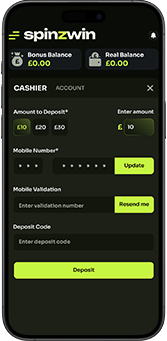
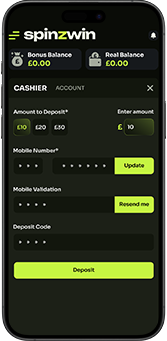
And that is about it, really. Most of the time the money is in your balance before you have even made up your mind which game to open.
Fees, Deposit Amounts and Limits
As mentioned earlier, Pay via Phone deposits are kept small. You choose from three fixed amounts, £10, £20 or £30, and as per our current terms, the most you can deposit in a day through this method is £30. If you are planning a bigger deposit, this is not the method for it, you would need to use a debit card or one of the other options in the cashier. Your phone network might have a monthly limit of its own for these charges as well, separate from ours, so in case a deposit gets refused near the end of the month, that may well be the reason.
Now the fee, which honestly is the part most people skip over. Put £20 in by phone and £3 of it goes on the fee, and on the full £30 it is £4.50, because PayViaPhone charges 15% on every single deposit, whatever the amount. On a tenner it comes to £1.50. It doesn’t sound like much the first time, but if you are topping up by phone a few times every month it adds up quicker than you would think, specially over a whole year, so do look at the amounts in the cashier properly before you press approve.
Some websites will tell you paying by phone costs nothing. Here, with this provider, it does cost something, and we thought it is only fair you hear that from us first. In case the fee puts you off, there are plenty of other methods sitting in the same cashier, have a look at those as well before you decide.
Why Do Players Like Paying by Phone?
Are you tired of getting the card out of your wallet, typing the long 16 digits, then the expiry date, then the three little numbers on the back, and getting one of them wrong on a phone keyboard anyway? Don’t worry; with Pay via Phone there are no card or bank details to give us at all. It is just your number and a code from a text, and on a small screen, with your thumb doing all the typing, that alone is a big relief for a lot of people.
It is quick too. You type the codes in, and usually a few seconds later the money is already sitting in your casino balance, no hanging around for anything. Then there are the small amounts. Some players actually like that the method keeps their spending low, you simply cannot deposit hundreds of pounds in one go this way, and seeing the casino spend sitting on its own line of the phone bill, seperate from the weekly shop on the bank statement, suits the way a few people like to keep track of things.
The Downsides You Should Know About
We like Pay via Phone, but it isn’t the right fit for everyone, and hence, here are the not-so-good bits too. The 15% fee is the biggest one, as discussed above. The low deposit amounts can feel a little limiting if you are used to topping up more at a time. Withdrawals are the other catch. Nothing can be paid back to a phone bill or to phone credit, it simply doesn’t work that way round, so for cashing out you will need a second payment method set up and ready.
There is one more thing that we feel very strongly about. When you are on a pay monthly contract, the deposit doesn’t leave your bank on the day you make it, it turns up weeks later on your phone bill. Gambling on credit cards has been banned in the UK since 14 April 2020, and a big part of why was that money you haven’t actually paid for yet is very easy to lose track of. Your phone bill isn’t a credit card, of course. On a contract though, it can feel a bit like one, so please count every deposit as spent on the same day you make it, even if the bill only turns up in your inbox weeks later.
Is Pay via Phone Safe?
Yes, and in fact safety is one of the reasons the method became so popular to begin with. As mentioned before, no card number and no bank details go into our cashier when you pay this way. Each deposit needs a code that is sent to your own mobile, so let’s say somebody got hold of your phone number somehow, it would still be no use to them without the actual phone in their hand. And the deposit goes through our secure, encrypted cashier, same as all the other payment methods do.
Spinzwin is operated by ProgressPlay Limited, which is licensed and regulated in Great Britain by the Gambling Commission under account number 39335. On the phone side, payments that are charged to a mobile bill generally come under the UK rules for phone-paid services, which Ofcom took over from the Phone-paid Services Authority on 1 February 2025. In case you ever spot a charge on your bill that you don’t recognise, contact your mobile network first, and then get in touch with our support team, we will help you check it against your account history.
How Do You Withdraw Your Winnings?
This is the question we get asked the most about this method. Pay via Phone only works for putting money in, so there is no sending your winnings back out the same way. When you want to make a withdrawal, you must choose another method in the cashier, such as a Visa debit card or a bank account, and the cashier will show you which options are avaialble for your account.
It is a good idea to add that method early, may be even around the time of your first deposit, so you are not sorting it out at the last moment. Don’t be surprised in case we ask you for a few documents before your first withdrawal, something to show who you are, where you live or the payment method you are using. Every licensed casino in the UK does this, and it is there to keep your account safe. When the checks are done, your withdrawal goes off to the method you picked. Isn’t that easy?
Pay via Phone vs Other Payment Methods at Spinzwin
Pay via Phone is only one of the payment options on our platform. Our cashier also accepts Visa debit cards, PayPal, Apple Pay, Paysafecard, Open Banking, Skrill, Neteller, Neosurf, AstroPay and Payz. Here is how a few of the popular ones compare, so you get to pick the one that suits you:
| Method | Where the Money Comes From | Card Details Shared with Us | Withdrawals |
|---|---|---|---|
| Pay via Phone | Phone bill or prepaid credit | No | No |
| Visa Debit Card | Your bank account | Yes | Yes |
| PayPal | Your PayPal account | No | Yes |
| Apple Pay | Card saved in Apple Wallet | No | Check the cashier |
| Paysafecard | Prepaid voucher | No | Check the cashier |
| Open Banking | Straight from your bank app | No | Check the cashier |
In case you want quick, small top-ups and would rather not share any card details, paying by phone may be the right fit for you. In case you want to deposit more than £30 in a day, or you like withdrawing to the same method you paid in with, a debit card or PayPal may suit you better. You can read more about how PayPal works at our casino on its own page.
Paying by Phone on Your Mobile
Do you want to top up and play during your lunch break or on the train home? Don’t worry; Pay via Phone was practically made for this. The whole Spinzwin site is optimized for iOS and Android smartphones and tablets, so the cashier, the deposit steps and the games all work just the same as they do on a desktop. Open our website on your mobile browser, log in, deposit by phone, and you are good to go. You can also pay by phone from a laptop or a PC, you will just need your mobile beside you to read the code.
Once the money lands, you get to pick from a huge collection of slots, jackpot games, roulette, blackjack and more. Fancy something quick? Starburst is a well-loved classic that is easy to pick up, with its expanding wilds that cover whole reels and give you a free re-spin, increasing the chances of the players landing more winning combinations. Real gambling comes with real risk though, every spin is random, and no payment method changes the odds of a game.
Keep Your Phone Bill Under Control
At Spinzwin, we take the matter of responsible gambling very seriously, and paying by phone is one area where a little planning goes a long way. Decide on a budget before you deposit, a proper number, and stick with it. You will be asked to set a deposit limit when you sign up with us, and you can come back and lower it or set a fresh one from your account whenever you like. Lowering it works pretty much straight away. Raising it takes a cooling-off period first, which is there on purpose, so you get a little time to think it over.
In case you ever feel the deposits are going higher than you meant, it is worth calling your network too, as many networks may let you put a spending cap on the bill or block these charges completely. And if gambling stops being fun at any point, please don’t just carry on. You can take a break or self-exclude from your account, GamStop will block every UK licensed gambling site for you in one go, and BeGambleAware offers free, confidential support for anyone who needs it. You must be 18 or over to play at Spinzwin.
Get Started with Pay via Phone at Spinzwin
Are you new to Spinzwin? Well then, you must first register and create an account with us before you can use Pay via Phone, and honestly it only takes a few minutes:
- Look for the ‘Join Now’ button at the top of our homepage and click on it, it is hard to miss.
- Fill in your details, the usual stuff like your name, email address, date of birth and mobile number, and pick a password that isn’t your pet’s name. Spinzwin is a safe, regulated and secure website. Your details are safe with us.
- Then comes your address and the country you live in, and somewhere around here you will be asked to set a deposit limit, so do have a number in your head before you get to it.
- The age and ID check comes next, every UK player has to go through it by law, so there is no skipping this one. Once you are done with the registration process. , click on the ‘submit’ button to complete the process.
- Now go to the Cashier, pick Pay via Phone and make your first deposit the way we showed you above.
- When it goes through, one confirmation may come from us and another from your mobile network, so don’t worry if your phone buzzes twice.
- You are all ready to play! Now, browse through the list of games we provide, find your favourite, launch it, and enjoy!
Are you ready to try then? Grab your phone, open the cashier, and see for yourself how quick it is.
FAQs
What is a pay by phone casino?
It’s a casino that takes your deposit through your phone instead of a card, so the money lands on your monthly bill, or comes out of your pay as you go credit if that is what you have got. Ours here is called Pay via Phone.
Can I use Pay via Phone at Spinzwin?
You can, as long as you are playing from the UK and you have a UK mobile number. It is sitting right there among the deposit options in our cashier, pick it and the steps will take you through the rest.
How much can I deposit by phone?
It’s £10, £20 or £30 each time, and £30 is the most that can go in through this method in one day. Anything above that has to go through one of our other payment options.
Is there a fee for paying by phone?
There is. A 15% fee applies to every PayViaPhone deposit, so a £20 deposit carries a fee of £3 only, and a £30 deposit carries £4.50. Do check the amounts before you confirm.
Can I withdraw my winnings to my phone bill?
No, unfortunately not. Pay via Phone works for deposits only, hence you will need another method, such as a Visa debit card or a bank account, for your withdrawals.
How long does a pay by phone deposit take?
Hardly any time at all, normally the money is there a few seconds after you put the codes in, and you get a text to confirm it too.
Do I need a contract phone, or does pay as you go work too?
Both can be used. On a contract, the deposit is added to your next bill, while on pay as you go it comes out of your current credit, so make sure there is enough on there to cover it.
Is it safe to deposit by phone?
It is, yes. There are no card or bank details involved, each payment has to be approved with a code that goes to your own phone, and our cashier is encrypted on top of that. As for us, Spinzwin is run by ProgressPlay Limited, which holds a Gambling Commission licence, account number 39335.
Why was my pay by phone deposit declined?
Most of the time it is something on the phone account, a spending cap, or a block on third-party charges that you may have forgotten you even set up. It can also happen when there isn’t enough pay as you go credit, when the number is in someone else’s name, or when you have already put in the £30 for the day. In case none of those fit, give your network a ring, they can see if anything on their side is stopping it.
Does pay by phone work with every UK network?
Not always, it comes down to your network and how your account is set up, because every network decides for itself what it allows on the bill for gambling. If yours says no, don’t worry, one of our other payment methods can be used instead.
What happens if I change my phone number?
Nothing much, really. Go into your Spinzwin profile, change the mobile number there, and use the new one the next time you deposit by phone. Your account and your balance don’t change at all.
Is paying by phone the same as using credit?
Not exactly, it isn’t a credit card, and in the UK you can’t gamble on a credit card anyway. But on a contract you pay for the deposit later, when the bill comes, so it is best to treat each deposit as money already spent.
Can I set a limit on my phone deposits?
Of course you can, and we would really encourage it. Whatever deposit limit you set in your Spinzwin account applies to all the payment methods, Pay via Phone too, and on top of that your network may let you put a spending cap on the bill.
 GAMES GLOBALAge of ConquestRead review
  GAMES GLOBALChristmas in PapertownRead review
  Reel FruitsRead review
  EvolutionDon’t Hit PlzRead review
  So Much CandyRead review
  Agent Jane Blone Max VolumeRead review
  GAMES GLOBALJungle Jim Gold BlitzRead review
  GAMES GLOBALBruno’s Vegas Gold BlitzRead review
  GAMES GLOBALPeaky PigsRead review
  GAMES GLOBALImmortal RomanceRead review
  SkywindPandora’s Box of EvilRTP 96.01%Volatility MediumRead review
  Ladies NiteRead review
  Reactoonz 2Read review
  GerminatorRead review
  Dolphin QuestRead review
  Blackjack H LiveRead review
  Vegas Downtown Blackjack GoldRead review
  xWays HoarderRead review
  Centre CourtRead review
  WazdanMighty Symbols JokersRead review
  GAMES GLOBALChocolossusRead review
  GAMES GLOBALLegend of PerseusRead review
  GAMES GLOBALKings of CrystalsRead review
  GAMES GLOBALFiona’s Christmas FortuneRead review